Remote Synchronization
Remote Synchronization syncs models between the current MatrixHub instance and a remote registry. The remote registry can be an external model source or another accessible MatrixHub instance, depending on the connection configured in Registry Management. A sync policy supports two directions:
- Pull: Sync resources from a configured remote registry into the current MatrixHub instance.
- Push: Sync resources from the current MatrixHub instance to a configured remote registry.
A policy can be triggered manually or scheduled with a cron expression. Each run creates a sync task, and the task is split into sync jobs by matched models.
Prerequisites
- Permissions: Only Platform Admins can create, edit, delete, and run remote sync policies.
- Registry connection: Create an available registry connection in Registry Management. Pull requires a source registry, and push requires a target registry.
- Target project: Confirm the project name where the sync result will be written.
- Schedule: If you select scheduled execution, prepare a five-field cron expression in the format
minute hour day month weekday.
Steps
-
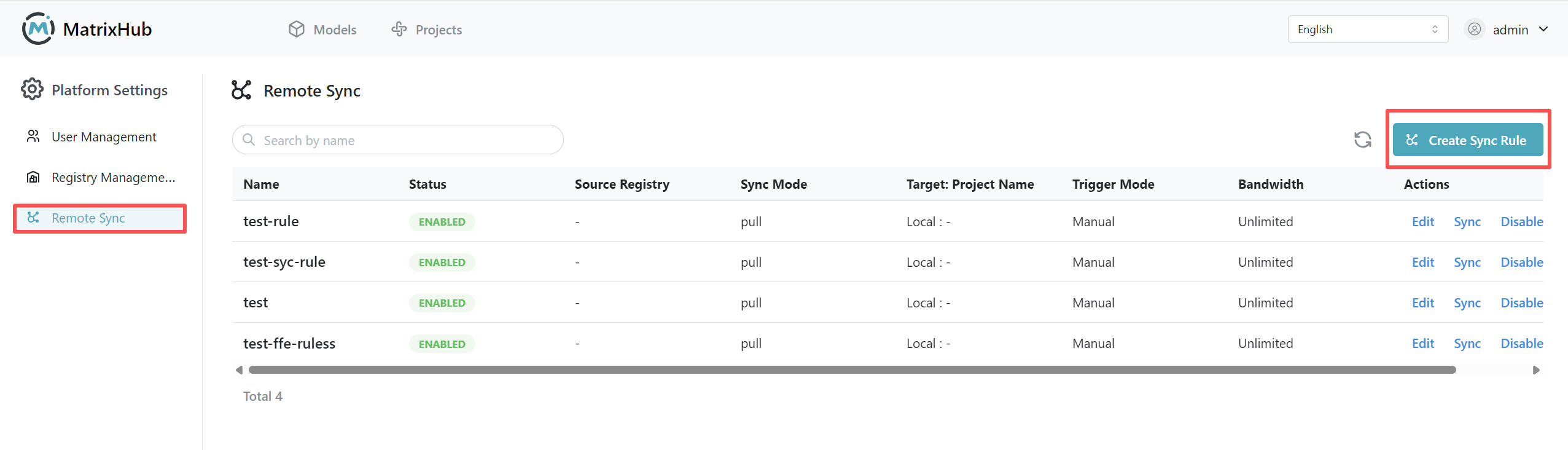
Log in to MatrixHub with an admin account, go to Platform Management in the navigation (or Platform Settings under the Admin dropdown), and open the Remote Synchronization page.
-
Click Create and complete the sync policy configuration in the modal.
- Fill in Name and Description.
- Select the Sync Rule, then select the corresponding Source Registry or Target Registry.
- Configure Resource Filter, Target Project, Trigger Mode, Bandwidth Limit, and Overwrite Existing Resources.
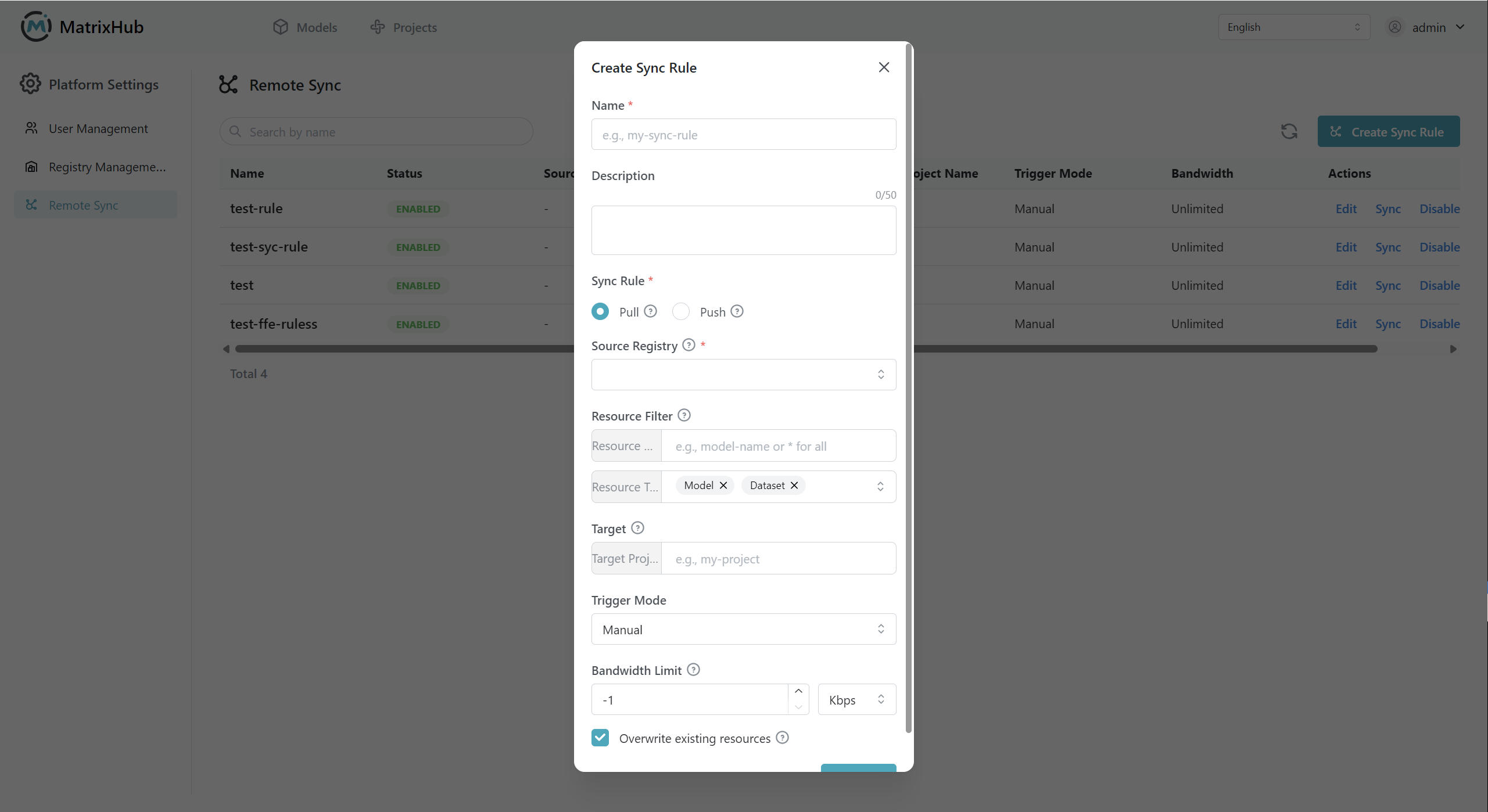
Use the following examples as a reference. Replace the registry, project, and resource names with values from your own environment.
Scenario Reference Configuration Pull a single model from a remote registry Sync Rule: Pull
Source Registry:matrixhub-remote
Resource Name:Qwen/Qwen3-0.6B
Resource Type: Model
Target Project:demo
Trigger Mode: Manual
Bandwidth Limit:-1Pull models from a remote registry in batch Sync Rule: Pull
Source Registry:matrixhub-remote
Resource Name:Qwen/**
Resource Type: Model
Target Project:demo
Trigger Mode: Scheduled
Cron:0 0 * * *
Bandwidth Limit:1024 KbpsPush a local model to a remote registry Sync Rule: Push
Target Registry:matrixhub-remote
Resource Name:demo/Qwen3-0.6B
Resource Type: Model
Target Project:test-org
Trigger Mode: Manual
Bandwidth Limit:-1Push all local models in a project to a remote registry Sync Rule: Push
Target Registry:matrixhub-remote
Resource Name:demo/**
Resource Type: Model
Target Project:test-org
Trigger Mode: Scheduled
Cron:0 0 * * *
Bandwidth Limit:1024 Kbps -
Click Confirm to create the policy. After creation, you can Sync, Edit, Enable/Disable, or Delete the policy from the list.
Tasks and Logs
-
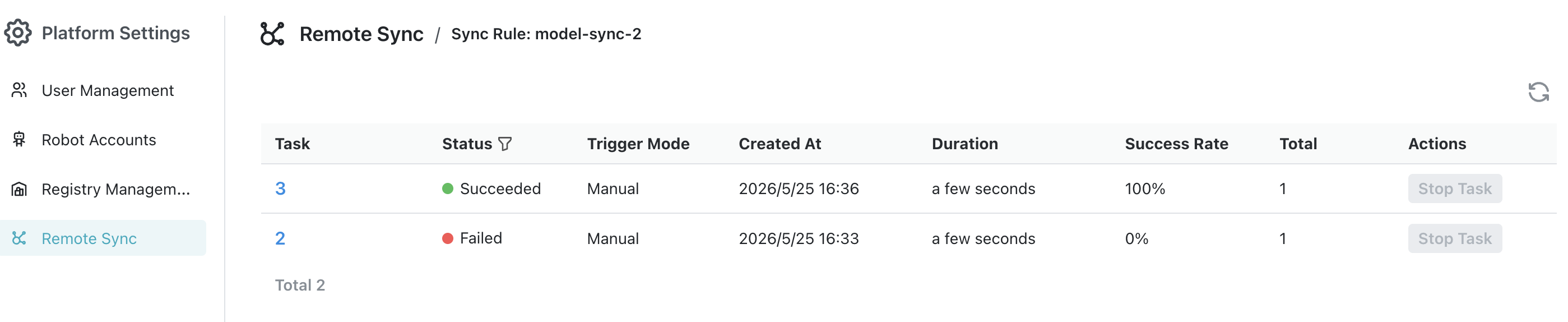
Clicking Sync creates a sync task immediately. Task statuses include Pending, Running, Succeeded, Failed, and Stopped.
-
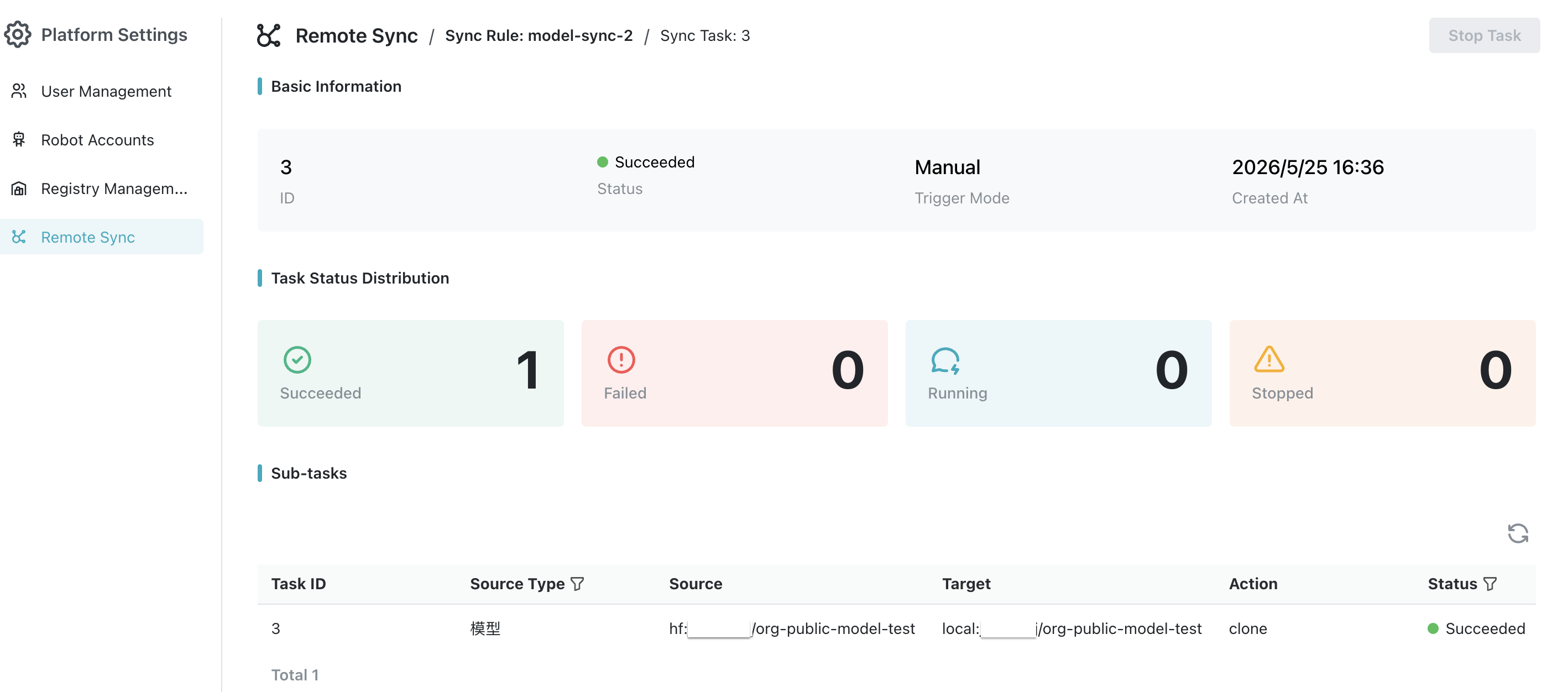
A sync task contains one or more sync jobs. Pull jobs use the action
clone; push jobs use the actionpush. -
In the task details, you can view each job's model information, source location, target location, execution status, and logs.
-
When you stop a running task, MatrixHub cancels in-flight jobs and marks unfinished jobs as stopped.
Configuration Parameters
| Parameter | Description |
|---|---|
| Name / Description | Used to identify the sync policy. The name must be at least 2 characters, contain only lowercase letters, numbers, dots, underscores, and hyphens, and start with a lowercase letter or number. Description is optional, up to 50 characters. |
| Sync Rule | Select the direction: Pull or Push. The direction cannot be changed after creation. |
| Source / Target Registry | Pull uses a source registry. Push uses a target registry. Registry connections are maintained in Registry Management. |
| Resource Name | The model path to sync, such as Qwen/Qwen3-0.6B. Pull and push support *, **, or Qwen/** for batch matching on the source registry or local MatrixHub. |
| Resource Type | Currently only Model is supported. |
| Target Project | For pull, this is a project in the current MatrixHub instance. For push, this is a project in the remote registry. |
| Trigger Mode / Cron | Run manually or on a five-field cron schedule. Cron is required only for scheduled policies. |
| Bandwidth Limit | -1 means unlimited. You can also enter a value in Kbps or Mbps using the page unit. |
| Overwrite Existing Resources | When enabled, models with the same name are overwritten by the sync result. When disabled, existing models are not overwritten. |
| Enabled State | When disabled, scheduled policies will not trigger automatically. |