Dynamo + MatrixHub integration experiment
We ran two experiments to measure how much an in-network MatrixHub speeds up the first model-weight download for a Dynamo inference service.
- Experiment 1: Deploy Dynamo on a GPU Kubernetes cluster and pull model weights from an internal MatrixHub. The result is an OpenAI-compatible inference service that can answer chat requests for the
qwen3-0.6bmodel. - Experiment 2: Repeat the same setup, but pull the weights from public Hugging Face instead, and compare the first-download time of the two runs.
Experiment 1
Environment
- Dynamo is installed — the Dynamo operator is already deployed in the cluster and can pick up the deployment file in step 2 and bring up the service automatically.
- GPU node — one NVIDIA A800 80GB, sliceable into 10 vGPUs. The node runs HAMi (a GPU virtualization component) that splits a physical GPU into several slices so multiple services can share the same card.
- In-network model hub (MatrixHub) — a MatrixHub model-weight registry is deployed internally (
matrixhub.internal:30001). Weights are pulled from here, never over the public internet. Thechenyang-qwen/qwen3-0.6bmodel was pre-cached on MatrixHub withhf download. - Network reachability — the cluster node
<cluster-node>can pull container images (nvcr.io) and reach the internal weight source MatrixHub (matrixhub.internal:30001).
Confirm the above first, especially that Dynamo and vGPU are ready.
Before you start
- The cluster kubeconfig file
- A machine with
kubectlinstalled
Step 1: Connect to the cluster
Open a terminal and set the kubeconfig (do this once per new terminal):
# Replace with the actual path to your kubeconfig file
export KUBECONFIG=<path-to-your-kubeconfig>
Verify connectivity:
kubectl get nodes
If you see the node list, you are good.
Step 2: Prepare the deployment file
Create a file dgd-vllm-vgpu.yaml with the following content:
apiVersion: nvidia.com/v1alpha1
kind: DynamoGraphDeployment
metadata:
  name: vllm-qwen-vgpu
  namespace: dynamo-system
spec:
  services:
    Frontend:
      componentType: frontend
      replicas: 1
      resources:
        requests:
          cpu: "2"
          memory: "4Gi"
        limits:
          cpu: "2"
          memory: "4Gi"
      extraPodSpec:
        mainContainer:
          image: nvcr.io/nvidia/ai-dynamo/vllm-runtime:1.1.1
          workingDir: /workspace
          env:
            - { name: HF_ENDPOINT, value: "http://matrixhub.internal:30001" }
          command: ["python3", "-m", "dynamo.frontend"]
          args: ["--http-port", "8000"]

    decode:
      componentType: worker
      subComponentType: decode
      replicas: 1
      resources:
        requests:
          cpu: "4"
          memory: "16Gi"
          custom:
            nvidia.com/vgpu: "1"          # 1 vGPU slice
            nvidia.com/gpumem: "10000"    # memory limit, MB (~10GB)
            nvidia.com/gpucores: "30"     # compute limit, 0-100
        limits:
          cpu: "4"
          memory: "16Gi"
          custom:
            nvidia.com/vgpu: "1"
            nvidia.com/gpumem: "10000"
            nvidia.com/gpucores: "30"
      extraPodSpec:
        mainContainer:
          image: nvcr.io/nvidia/ai-dynamo/vllm-runtime:1.1.1
          workingDir: /workspace
          env:
            - { name: HF_ENDPOINT, value: "http://matrixhub.internal:30001" }
          command: ["python3", "-m", "dynamo.vllm"]
          args:
            - --model
            - chenyang-qwen/qwen3-0.6b
            - --served-model-name
            - chenyang-qwen/qwen3-0.6b
            - --tensor-parallel-size
            - "1"
            - --gpu-memory-utilization
            - "0.85"
            - --max-model-len
            - "8192"
            - --no-enable-log-requests
Note: the HF_ENDPOINT environment variable points to the internal MatrixHub address http://matrixhub.internal:30001.
Common things you may want to change later:
| What to change | Where |
|---|---|
| Switch model | replace both chenyang-qwen/qwen3-0.6b with the new model name |
| More GPU memory | raise both nvidia.com/gpumem: "10000" (unit MB) |
| More compute | raise both nvidia.com/gpucores: "30" (max 100) |
Step 3: Deploy
kubectl apply -f dgd-vllm-vgpu.yaml
Step 4: Wait for it to come up
kubectl -n dynamo-system get pods -l nvidia.com/dynamo-graph-deployment-name=vllm-qwen-vgpu -w
Wait until both pods show 1/1 Running (the first deploy pulls images and may take a few minutes).


Check the service logs:
kubectl -n dynamo-system logs <pod-name> --tail=50
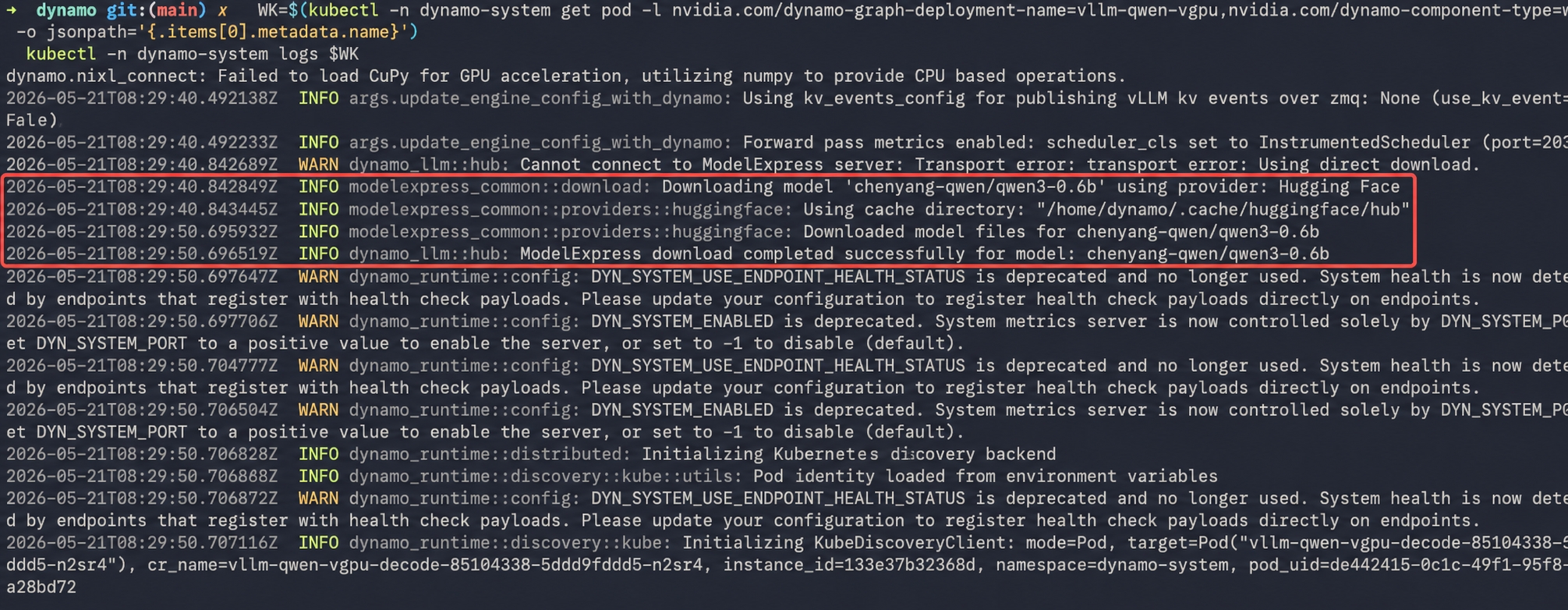
Because MatrixHub is deployed internally and the model is already cached (HF_ENDPOINT points to MatrixHub), the model download takes about 10 seconds:
Step 5: Test the service
First get the frontend pod name:
kubectl -n dynamo-system get pods | grep frontend
Test with that name (replace <frontend-pod> with what you found above):
kubectl -n dynamo-system exec <frontend-pod> -- curl -s http://localhost:8000/v1/chat/completions \
  -H 'Content-Type: application/json' \
  -d '{"model":"chenyang-qwen/qwen3-0.6b","messages":[{"role":"user","content":"Introduce yourself in one sentence"}],"max_tokens":64}'
If the model returns a reply, the deployment succeeded.

Experiment 2
Everything else is identical to Experiment 1. Just remove the HF_ENDPOINT environment variable from the deployment YAML, and it falls back to pulling model weights from public Hugging Face.
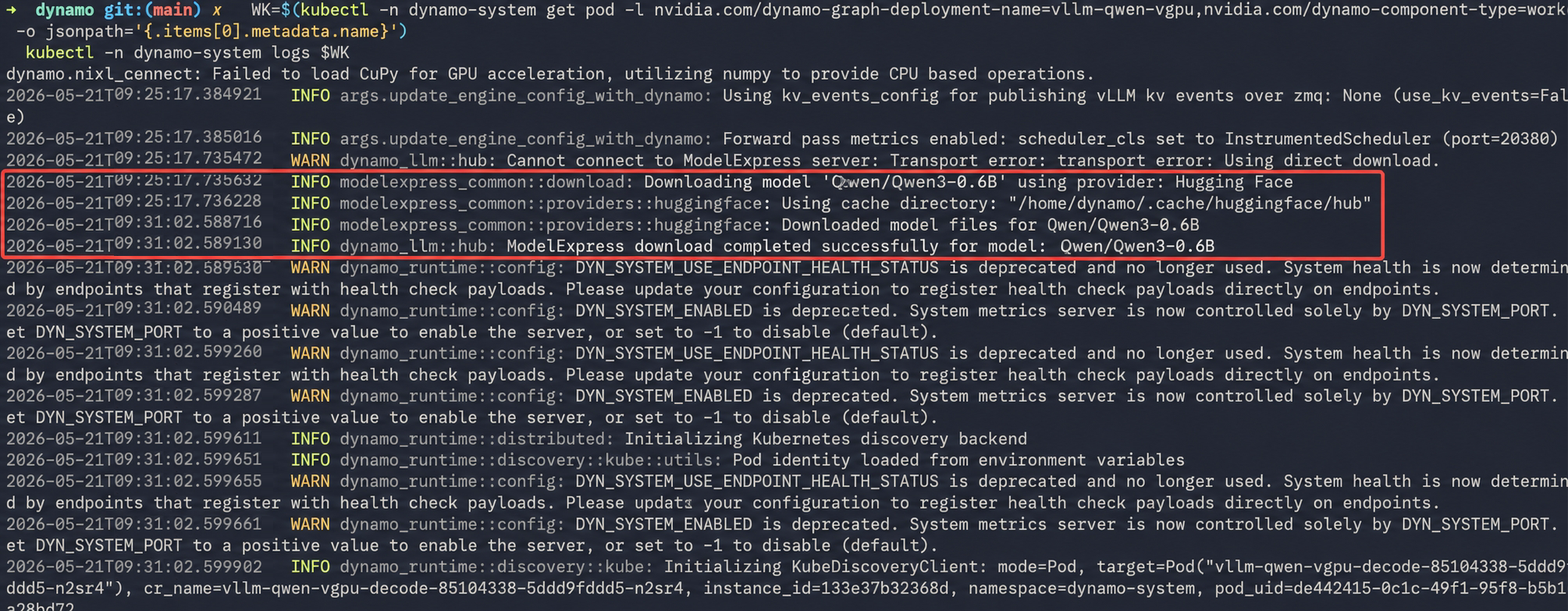
Without MatrixHub (downloading from public Hugging Face), the logs show the model download takes about 6 minutes:
Results: first-download time comparison
Measured per-stage timings for the two cases — "internal MatrixHub with the model pre-cached" vs. "no MatrixHub" — using the qwen3-0.6b model. The first-download comparison is shown below:
| Stage | Experiment 1 (internal MatrixHub, model cached) | Experiment 2 (no MatrixHub) |
|---|---|---|
| Pull container image (10GB+) | seconds (cached on node) | seconds (cached on node) |
| Download model weights | ~10 s (from internal MatrixHub cache) | ~6 min (from public Hugging Face) |
| vLLM engine start + model load | 1–2 min | 1–2 min |
Conclusion
An in-network MatrixHub significantly accelerates Dynamo's first model-weight download.